Form Settings — Google Sheets Integration
Google Sheets integration sends new submissions into a Google Sheet automatically.
This is useful when you want a shared team record, easier filtering, or a backup outside email.
Google Sheets integration is available for paid plans only.
Open Google Sheets Setting
- Open Forms.
- Choose your plan.
- Click 🛠️ Form Settings.
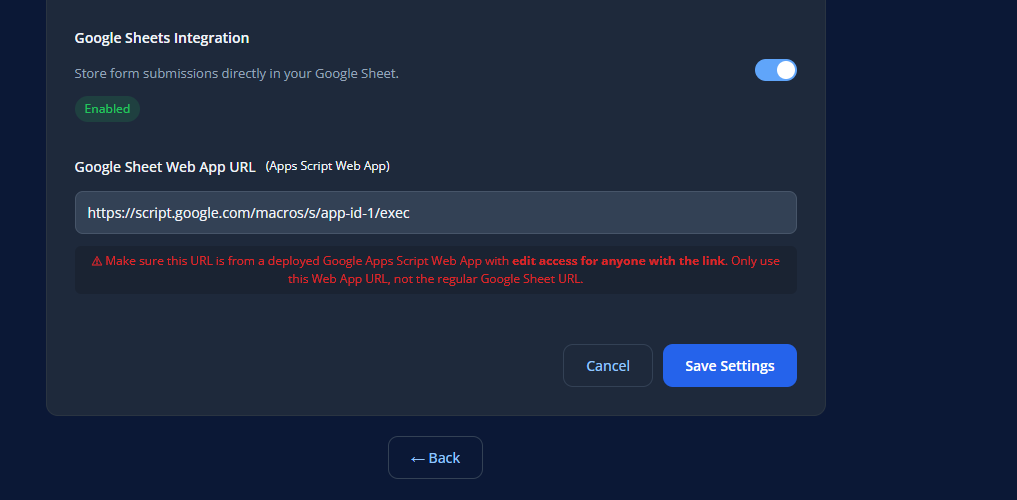
- Locate the Google Sheets section.
Before You Enable Google Sheets
Make sure you have:
- a Google Sheet ready
- a Google Apps Script Web App URL
- the correct Web App link, not the normal sheet link
Google Sheets Example
If Google Sheets Does Not Work
Check the following:
- use the Apps Script Web App URL
- do not use the regular Google Sheet URL
- confirm the web app is deployed
- confirm the permissions allow access
- submit a fresh test entry
Best Practices
- keep the sheet columns organized
- test with a fresh submission
- use the deployed Apps Script web app URL
- verify permissions before going live
Save Changes
After updating Google Sheets integration:
- Click Save Settings.
- Submit a test entry.
- Confirm the submission appears in the correct Google Sheet.